Knowledge Base

When Is QuickBooks Desktop Going Away?
Knowledge Base

When Is QuickBooks Desktop Going Away?

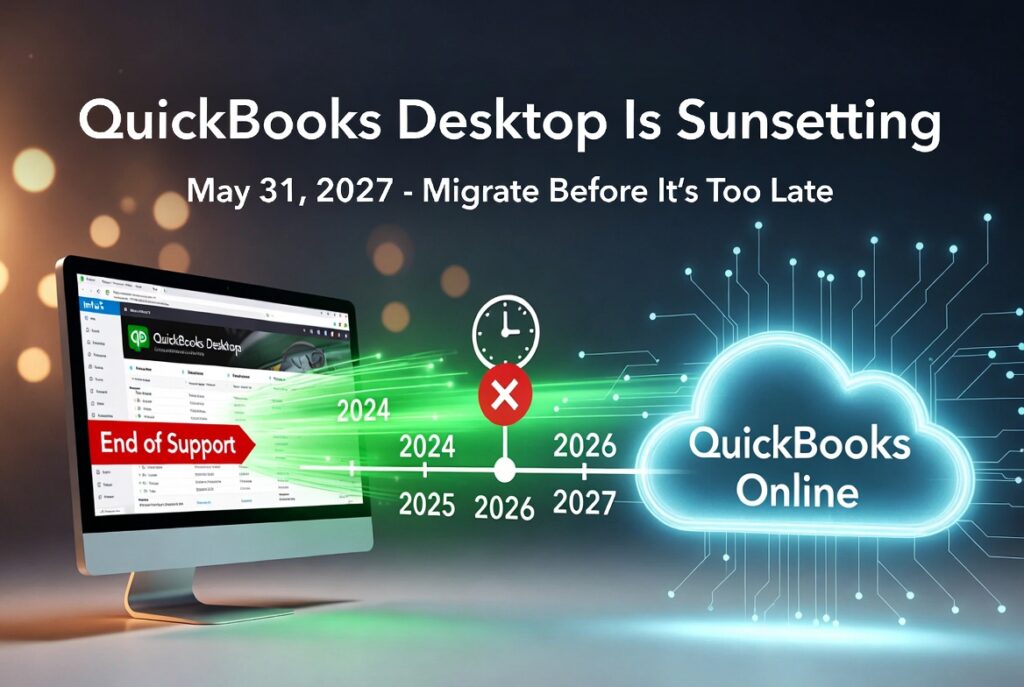
The Complete 2026 Timeline + What It Means for Your Business QuickBooks Desktop has been a staple for millions of small businesses for decades. But if you’ve heard rumors that it’s “going away,” you’re not alone — and the confusion is real. Short answer: QuickBooks Desktop is not disappearing overnight. New sales of the main Pro, Premier, and Mac versions stopped in 2024, no new major versions are being released after 2024, and full support for the final version (2024) ends on May 31, 2027. After that date, the software will still run on your computer, but you’ll lose security updates, technical support, payroll integration, bank feeds, and other critical services. Here’s the full, up-to-date picture as of February 2026. The Official Timeline (U.S. Focus) Date What Happened / Will Happen Affected Versions Sept 30, 2024 Intuit stopped selling new subscriptions to Pro Plus, Premier Plus, Mac Plus & Enhanced Payroll Pro, Premier, Mac (new customers) May 31, 2025 Full support ended (no more updates, payroll, bank feeds, live support) 2022 versions May 31, 2026 Full support ends 2023 versions May 31, 2027 Full support ends for the last QuickBooks Desktop version ever released 2024 versions (Pro, Premier, Mac) After May 31, 2027 Software still works offline but is completely unsupported All non-Enterprise Desktop Important notes: What “Support Ending” Actually Means After the discontinuation date for your version: The software doesn’t suddenly delete itself or stop launching — it just becomes an unsupported legacy product. Why Is Intuit Doing This? Intuit is aggressively pushing everyone toward QuickBooks Online (QBO) — their cloud platform. What Should You Do Right Now? (Action Plan for 2026) How to Migrate Smoothly (Quick Tips) Final Thoughts QuickBooks Desktop isn’t vanishing tomorrow, but its end is clearly in sight — May 31, 2027 is the real deadline for the last supported version. Businesses that wait until 2027 will face rushed migrations, potential data issues, and higher costs. The smartest move in 2026 is to start planning your transition now while you still have full support and time to do it right. Still want to stay on Desktop a little longer? Stock up on the final new QuickBooks Desktop Pro, Premier, or Enterprise licenses at the absolute cheapest prices on the market today at LicenseRetail.com. 👉 Click Here to Get Your New QuickBooks Desktop License at the Lowest Price Your business deserves software that’s secure, supported, and built for the future — or the best deal on the last desktop licenses while they last. Last updated: February 2026. Always verify current pricing and availability directly on licenseretail.com.
Knowledge Base

QuickBooks Desktop 2024 Review 2026 : Still Worth It Today?

If you’re searching QuickBooks Desktop 2024 review in 2026, you’re not alone. Thousands of small business owners, bookkeepers, and accountants want to know: is it still worth using — or is it time to switch? Quick Verdict — Key Takeaways QuickBooks Desktop 2024 is still fully functional for core accounting in 2026 Intuit stopped selling new Pro, Premier & Mac Plus subscriptions after September 30, 2024 No QuickBooks Desktop 2025 was released — 2024 is the final version for Pro/Premier Biggest risks: connected services (bank feeds, payroll, payments) winding down Surplus perpetual licenses are legally available — no subscription required Smart choice if you value local data control and stable workflows Want QuickBooks Desktop 2024 without a subscription? LicenseRetail sells genuine surplus perpetual licenses — one-time payment, no monthly fees, no subscription ever required. View Pro 2024 — No Subscription → What Actually Changed in 2026 Two major events created all the confusion around QuickBooks Desktop: Stop-sell for new US subscribers — Intuit stopped selling new subscriptions for QuickBooks Desktop Pro Plus, Premier Plus, and Mac Plus to brand-new US customers after September 30, 2024. No 2025 version — There is no standard QuickBooks Desktop 2025 release. The 2024 version remains current and final for Pro/Premier users. The result: the only way to get QuickBooks Desktop Pro or Premier today is through the secondary market — via legitimate surplus licenses sold under the first-sale doctrine. Pros and Cons — Honest 2026 Assessment ✅ Where QuickBooks Desktop 2024 Still Wins Your data stays 100% on your own computer — no cloud, no subscription required Familiar desktop workflows that long-time bookkeepers and accountants prefer Excellent for complex reporting, multi-year history, and detailed job costing Native Windows 11 (64-bit) support — runs smoothly when installed correctly Lower long-term cost with a one-time perpetual license vs annual subscription Works completely offline — no internet required for core accounting ❌ Where It’s Now Risky Connected services (live bank feeds, payroll updates, payments) require an online subscription No future major version upgrades — 2024 is the final Pro/Premier release Live technical support has a limited window (plan for ~2027 end of service) Not ideal for remote/mobile teams who need anytime access from any device Support & Services Timeline — What “Supported” Really Means In 2026, “still supported” means different things depending on the service: Service Status in 2026 Core bookkeeping, invoicing & reports ✅ Works fully — no internet needed Manual bank reconciliation ✅ Works fully — import statements manually Live bank feeds ⚠️ Requires active Intuit subscription Payroll (automated tax tables) ⚠️ Requires active payroll subscription Credit card & payment processing ⚠️ Subscription-dependent Live technical support ✅ Available while subscribed (until ~2027) Security & software updates ✅ Available during supported period Pricing Reality in 2026 — Subscription vs One-Time License Intuit now pushes everyone toward annual subscriptions: Pro Plus subscription: $1,149/year (raised February 2026) Premier Plus subscription: $1,609/year Enterprise Silver: from $1,703/year The alternative — and what many businesses are choosing — is a genuine surplus perpetual license. These are legitimate corporate volume licenses resold under the first-sale doctrine. No subscription, no annual renewal, no recurring fees. See our full breakdown: How Much Does QuickBooks Desktop Cost in 2026? QuickBooks Desktop 2024 vs Online vs Enterprise — Honest Comparison Need Desktop 2024 QuickBooks Online Desktop Enterprise Local data control ✅ Best ❌ Cloud only ✅ Excellent Works fully offline ✅ Yes ❌ No ✅ Yes No subscription option ✅ Surplus license ❌ Always subscription ✅ Surplus license Advanced inventory ⚠️ Basic only ⚠️ Plan-dependent ✅ Best in class Remote / mobile access ⚠️ Needs hosting ✅ Easiest ✅ With hosting Users supported Up to 3 (Pro) / 5 (Premier) Unlimited (paid per user) Up to 40 Best for Small businesses, local workflows Remote/mobile teams Growing businesses Full breakdown: QuickBooks Desktop vs Online 2026 — The Full Comparison Who Should Keep QuickBooks Desktop 2024 in 2026? ✅ Desktop 2024 is the right choice if you: Want your data on your own computer — not in the cloud Prefer to pay once and own it permanently Run a small business with 1–5 users on a local network Need detailed reporting and multi-year company history Already know Desktop well and don’t want to relearn QuickBooks Online ❌ Consider switching if you: Need access from multiple devices or remote locations Rely heavily on live bank feeds and automated payroll Have a team larger than 5 users (consider Enterprise instead) Want automatic software updates and cloud backups Risk-Reduction Checklist — If You Keep Desktop 2024 Run on Windows 11 (64-bit native) — not Windows 10 which lost support Oct 2025 Set up daily local backups + weekly offsite or cloud backup of your .QBW file Export key reports monthly to PDF or Excel as a safety net Document your license number, product key, and download source Decide now on your exit plan — Online or Enterprise — for when support ends around 2027 Get a genuine no-subscription license — Pro, Premier or Enterprise One-time payment. No subscription. No monthly fees. Your data stays offline on your computer. Pro 2024 → Premier 2024 → Enterprise 2024 → Frequently Asked Questions Is QuickBooks Desktop 2024 still supported in 2026? Yes for core accounting features — invoicing, reports, expense tracking all work fully. Connected services like live bank feeds and payroll require an active Intuit subscription. Full support is expected through approximately 2027. Can I still buy QuickBooks Desktop 2024 as a new customer? Yes — through the secondary market. Intuit stopped selling new Pro/Premier subscriptions in the US after September 30, 2024, but genuine surplus perpetual licenses are legally available through retailers like LicenseRetail under the first-sale doctrine. Is there a QuickBooks Desktop 2025? No. Intuit did not release a standard QuickBooks Desktop 2025 for the Pro/Premier line. QuickBooks Desktop 2024 is the current and final version. Enterprise continues to receive updates under its subscription model. What happens if my QuickBooks Desktop subscription expires? You typically lose access to connected services

Knowledge Base

QuickBooks Desktop Download 2026: Safe Official Link + Install Guide

Looking for the safe official QuickBooks Desktop download link in 2026? Whether you’re reinstalling after a PC crash, moving to a new computer, or setting up a fresh license — this guide has the exact steps. ⚠️ Important Before You Download Only download from Intuit-owned pages — never from third-party sites offering “cracks” or “keygens” Intuit stopped selling new Pro/Premier/Mac Plus subscriptions in the US after September 30, 2024 QuickBooks Desktop 2024 is the current final version — there is no 2025 or 2026 edition for Pro/Premier You need a valid license key to activate after downloading — see below if you need one Need a genuine QuickBooks Desktop license to activate? LicenseRetail sells genuine surplus perpetual licenses — one-time payment, no subscription required. Pro 2024 → Enterprise 2024 → The Only Safe Download Sources in 2026 Rule #1: Only download from Intuit-owned domains. Official QuickBooks Desktop Download Page (2026): https://downloads.quickbooks.com/app/qbdt/products Sign in with your Intuit account → select Country → Product → Version (2024) → Download ✅ Safe domains: quickbooks.intuit.com · downloads.quickbooks.com ❌ Avoid: Any site offering cracked versions, free serial keys, or “unlock” payments ❌ Avoid: Torrent sites, unofficial mirrors, or any domain that isn’t intuit.com System Requirements — QuickBooks Desktop 2024 Component Minimum / Recommended Operating System Windows 11 64-bit (strongly recommended) or Windows 10 64-bit Processor 2.4 GHz or faster (Intel or AMD x86 — ARM not supported) RAM 8 GB minimum · 16 GB recommended Disk Space 2.5 GB + space for company file Screen Resolution 1280 × 1024 or higher Internet Not required for core features — fully offline capable Note: Microsoft ended Windows 10 support in October 2025. Windows 11 is strongly recommended for maximum security. Before You Install — 5-Minute Prep Checklist Back up your existing company file (.QBW) to an external drive or cloud storage Note your current license number and product key (Help → Product Information in QuickBooks) Make sure you’re logged in as a Windows Administrator Download the latest QuickBooks Tool Hub first — it fixes 90% of installation issues Temporarily disable antivirus during install (re-enable after) Step-by-Step Installation Guide — Windows 11 & Windows 10 Go to downloads.quickbooks.com → sign in → select your product and version (2024) → Download Once downloaded, right-click the installer file → Run as Administrator Accept the license agreement → choose install type: Express — single user, installs to default location (recommended for most) Custom/Network — multi-user setup or custom install path Enter your License Number and Product Number when prompted Click Install → wait for completion (5–10 minutes) Open QuickBooks → it will automatically check for and install the latest update (R18_60 as of 2026) Open your company file and verify everything loads correctly Common Installation Errors & Fast Fixes First step for any error: Download and run QuickBooks Tool Hub (latest version) — it fixes most issues automatically. Error Cause Fix Error 3371 License component issue Tool Hub → Installation Issues → 3371 Error Fix (30 seconds) Error 1603 / 1935 Microsoft components missing Tool Hub → Quick Fix my Program → reboot → retry as Admin H202 / H505 Multi-user network issue Tool Hub → Network Issues tab → QuickBooks Database Server Manager Error 6123 / 6000 Company file access issue Tool Hub → Company File Issues → Run QuickBooks File Doctor Not responding / freezing Program corruption Tool Hub → Program Problems → Quick Fix my Program For installation help, see also: How to Install QuickBooks Desktop 2024 — Full Step-by-Step Guide Moving QuickBooks to a New Computer? Download the installer fresh on the new computer from the official link above Transfer your company file (.QBW) via external drive, USB, or network share Deactivate the license on your old computer first (Help → Manage My License → Deactivate) Activate on the new computer using the same license key Full guide: How to Move QuickBooks Desktop to a New Computer Need a genuine license to activate your download? One-time payment — no subscription required. Each license is manually verified before delivery. Pro 2024 → Premier 2024 → Enterprise 2024 → Frequently Asked Questions Where can I download QuickBooks Desktop safely in 2026? Only from Intuit’s official portal: downloads.quickbooks.com/app/qbdt/products. Sign in with your Intuit account, select your country, product, and version (2024), then download. Can I still download QuickBooks Desktop 2024 in 2026? Yes — if you have a valid license key. You can always download the installer from Intuit’s official portal. You need your license number and product number to activate after downloading. Is there a free trial for QuickBooks Desktop 2024? Yes — Intuit offers a 30-day free trial for QuickBooks Desktop Enterprise (no credit card required). Pro and Premier no longer have new trials available as of the 2024 stop-sell. Does QuickBooks Desktop 2024 work on Windows 11? Yes. Fully supported on Windows 11 64-bit natively installed. Windows 11 is strongly recommended since Microsoft ended Windows 10 support in October 2025. What is the latest version/release of QuickBooks Desktop 2024? As of 2026, the latest release is R18_60. QuickBooks will prompt you to update automatically when you first open it after installation. You can also manually check: Help → Update QuickBooks Desktop. I lost my license key — how do I recover it? Log in to your Intuit account at camps.intuit.com and look under Licenses & Products. If you purchased from LicenseRetail, check your original delivery email — your license key is in there. How do I fix QuickBooks Error 3371? Download and run the QuickBooks Tool Hub → go to Installation Issues → click the 3371 Error Fix button. This takes about 30 seconds and fixes the issue in almost all cases. Where do I get a genuine license key if I don’t have one? LicenseRetail sells genuine surplus perpetual licenses for QuickBooks Desktop Pro, Premier, and Enterprise 2024 — one-time payment, no subscription required. Each license is manually verified before delivery and covered by our Activation Guarantee.

Knowledge Base, Uncategorized

How to Upgrade to QuickBooks Desktop 2024 Without Losing Your Data

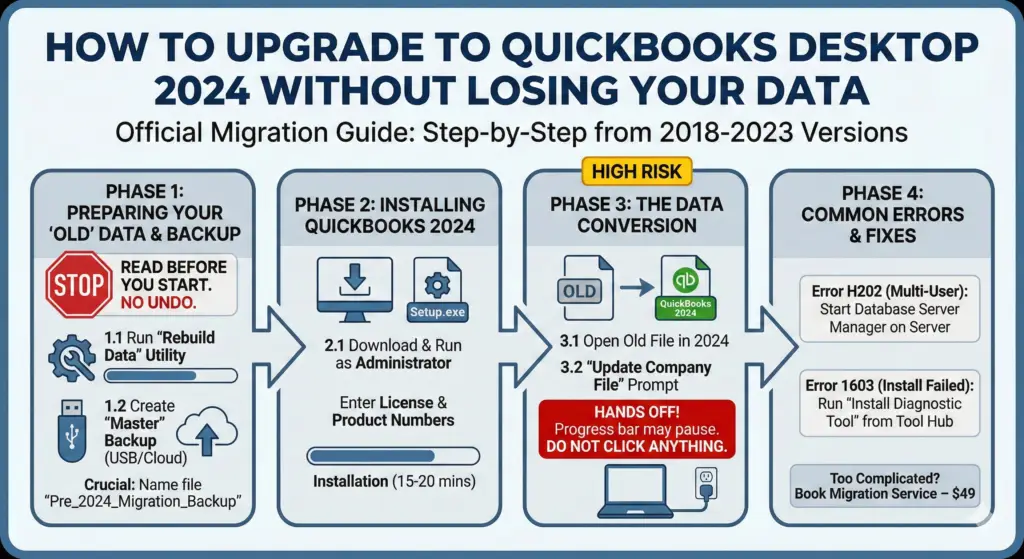
Official Migration Guide Step-by-Step: Upgrading to QuickBooks Desktop 2024 A complete walkthrough for moving your company data from 2018-2023 versions to the new 2024 architecture without data corruption. ⚠️ STOP: Read Before You Start Once you convert your company file to QuickBooks 2024, it cannot be opened in older versions (2023 and below). There is no “undo” button. You MUST make a backup before proceeding. Phase 1: Preparing Your “Old” Data Most upgrade failures happen because the old file had hidden errors. Do not install the new software until you perform these clean-up steps in your current version of QuickBooks. Step 1.1: Run the ‘Rebuild Data’ Utility This tool fixes minor database fractures that could crash the 2024 installer. Open your current QuickBooks (Admin mode). Go to the top menu: File > Utilities > Rebuild Data. QuickBooks will ask to make a backup. Click OK. Let the tool run. It may say “QuickBooks is not responding”—this is normal. Do not close it. Once finished, it will say “Rebuild has completed.” Step 1.2: Create the “Master” Backup You need a portable copy of your file in case the computer crashes during the update. Insert a USB Drive or open a Cloud Folder (Dropbox/OneDrive). Go to File > Back Up Company > Create Local Backup. Select Local Backup and click Next. Click Browse and select your USB drive. Crucial: Name the file “Pre_2024_Migration_Backup”. Phase 2: Installing QuickBooks 2024 Step 2.1: Download & Install Use the official link provided in your LicenseRetail order email. Right-click the downloaded Setup.exe file and select “Run as Administrator”. When asked, enter your License Number and Product Number. Accept the Terms and click Next. Choose “Express” (recommended) or “Custom” (only if installing on a server). Click Install. This process typically takes 15-20 minutes. Phase 3: The Data Conversion (High Risk) This is the moment where the database structure is rewritten. Ensure your laptop is plugged into power. Step 3.1: Open the Old File Launch QuickBooks Desktop 2024. Click “Open or Restore an Existing Company”. Select “Open a company file” and click Next. Browse to your file (usually in Documents/QuickBooks). Step 3.2: The “Update” Prompt You will see a popup: “Update Company File to New Version”. Check the box: “I understand that my company file will be updated…” Click Update Now. QuickBooks will ask where to save a backup *again*. Do it. You can never have too many backups. HANDS OFF: The progress bar may sit at 5%, 50%, or 99% for up to 45 minutes. DO NOT CLICK ANYTHING. If Windows asks “QuickBooks is not responding,” select “Wait.” Too Complicated? Don’t Risk It. Data migration is technical and risky. If you are uncomfortable with file paths, database rebuilds, or server settings, let us do it for you. Book Migration Service – $49 Includes: AnyDesk Remote Login • Health Check • Full Conversion • Data Verification Phase 4: Common Errors & Fixes Error: “H202” (Multi-User) Cause: The 2024 Database Manager isn’t running on the server. Fix: Go to the Server, open Start Menu > QuickBooks Database Server Manager, and click “Start Scan.” Error: “1603” (Install Failed) Cause: Windows .NET Framework is outdated. Fix: Download the “QuickBooks Tool Hub” from Intuit and run the “Install Diagnostic Tool.” Get Your 2024 License Now Buy Pro Plus 2024 | Buy Premier Plus 2024 | Buy Enterprise 24.0

Scroll to Top